Architecture as a craft that generates the plan
This web page focuses on the architecture as a craft. It focuses on creating a good plan that shows the customer what software they will get and the builders how to build it.
What does the plan look like?
Creating a software architecture means creating a plan of the software. The following documents (containing different views of the software) are useful parts of this plan.
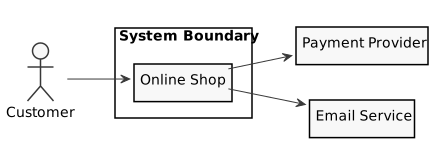
Context view (Use Case Diagram, Component Diagram)
The context view defines the boundary between the software and the environment of the software. This is crucial for the builders to know what they shall build and what others are building or what is already present. It is also crucial for the builders to know how to interact with the environment. Beware to define the boundary clearly. E.g. if the software gets data from the environment, the interface must be defined completely before building starts or at least it must be clear who is paying, planning and building the interface.
Building block view (Component Diagram, Package Diagram, Class Diagram)
The building block view shows the parts of the software and how these are connected. Beware that the interfaces are important and should be treated with the same effort as the parts.

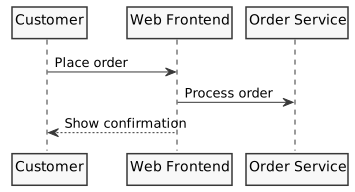
Runtime view (Sequence Diagram, Activity Diagram, Communication Diagram)
The runtime view shows how the parts of the software interact at runtime, e.g. the sequence of calls, the processes involved and the communication flows. This is crucial for the builders to understand the dynamic behavior of the software and to identify potential performance or reliability issues early.
Data view (Class Diagram, Object Diagram)
The data view shows what data is stored, exchanged and in what format. This is crucial for the builders to understand the data structures and the flow of data through the system, and to ensure that the data is consistent and complete.

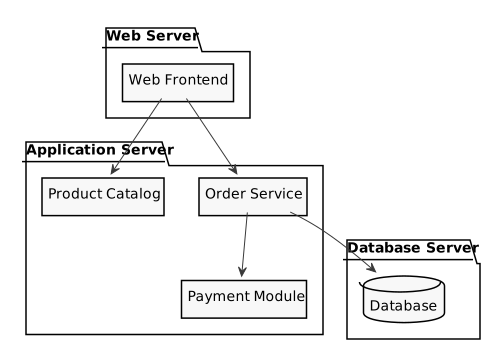
Deployment view (Deployment Diagram)
The deployment view shows how the software is mapped to infrastructure, e.g. servers, containers or networks. This is crucial for the builders to understand where the software runs and how it is operated, and to ensure that the infrastructure fits the requirements of the software.
User interface view (Wireframe, User Flow Diagram)
The user interface view shows what controls the user will see and interact with, e.g. forms, buttons and navigation elements. For wizard-like flows, it also shows the sequence of steps. This is crucial for the customer to verify the software will be usable, and for the builders to understand the expected interaction patterns.

Other parts of other plans
The plan of the architect may contain the parts mentioned above. It may contain further parts, but there are parts that are not part of the plan. Examples are:
- Time plan
- Resource plan
- Burndown chart
Cross-cutting concepts
This web page does not focus on cross-cutting concepts. Classic cross-cutting concepts like logging or security are treated as building blocks.
A remark about the details
Some people assume that architecture only concerns the large parts, not the details. Beware that you must know and consider all details that have an effect on the architecture (e.g. one small system in the environment that can only be reached from the local network may have the effect that you can't deploy the software to the cloud).
What is the foundation to be able to create a good plan?
To be able to create a good plan, the architect needs the following fundamental information.
- State of the art: what technology is available, with properties, advantages and disadvantages.
- Experience from similar previous projects.
- The goals of the customer
- The constraints.
- The requirements.
What answers does the plan have to include?
When looking at the finished plan, the answers to the following questions should be visible.
- In which processes are which components of the system running.
- On which platforms are which components of the system running.
- Which components can be deployed independently.
- When there are independently deployed components: how to know which ones are compatible.
- When there are independently deployed components: can these components be used without the other components.
- Where is the persistent data (that survives a restart) stored.
- How do the components in the same processes communicate.
- How do the components in different processes communicate (e.g. named pipes, shared memory, REST, MQTT, queues, ...).
- How do the components on independently deployed components communicate (e.g. REST, email, file transfer, ...).
- What is the architectural style, or styles (e.g. Monolith, Modulith, Microservices, ...).
- What are the upper limits of responses (e.g. 2s after a user input, 2s for a REST call, ...).
Common answers
For each of the questions above, these are the most common options to choose from.
- Processes
- Single process
- One process per layer (e.g. web server + app server)
- One process per service
- Platforms
- On-premises server
- Cloud VM
- Container (Docker/Kubernetes)
- Serverless (e.g. AWS Lambda)
- Desktop application
- Mobile device
- Embedded device
- Independent deployment
- Single deployment unit (all together)
- Frontend and backend separately
- Each service independently
- Compatibility of independent deployments
- API versioning
- Semantic versioning
- Contract testing
- Usable without other components
- Yes (self-contained)
- No (requires all components)
- Partially (graceful degradation)
- Persistent data storage
- Relational database (e.g. PostgreSQL, SQL Server)
- NoSQL database (e.g. MongoDB, Redis)
- File system
- Cloud object storage (e.g. S3)
- Embedded database (e.g. SQLite)
- Same-process communication
- Direct method/function calls
- Events/callbacks
- In-process message bus
- Different-process communication
- REST
- gRPC
- Message queue (e.g. RabbitMQ, Kafka)
- Shared memory
- Named pipes
- Sockets
- MQTT
- Independently deployed communication
- REST
- gRPC
- Message broker
- File transfer
- Webhooks
- Architectural style
- Monolith
- Modulith
- Microservices
- SOA
- Client-Server
- Event-Driven
- Serverless
- Response time limits
- < 100ms (real-time)
- < 1s (interactive)
- < 5s (web request)
- < 30s (complex operation)
- Minutes/hours (batch)